Archive | October, 2013

Notes from the wunderground, Part 1: It Looks Like Rain

31 Oct

In-jokes are for the in crowd, and if you’re out, you’ll click uncomprehendingly past the wunderground.com’s very name, wilfully cute shorthand for Weather Underground, and its in-plain-sight harkening to the 60s radical group by that very name.

They’re based in San Francisco, you see, where such allusions are knowingly received; but history aside, wunderground.com backlogs all kinds of information about things meteorological, and that doesn’t sound too subversive, does it? Call me a naïf, then, but I’m not mine-sweeping the data for clandestine, coded hints to the cadre; I’m prepared to believe it’s actual weather data you’re looking at.

And among many other confidences into which wunderground will take you is historical data for a great multitude of localities, and that’s good news for spreadsheet pattern spotters. Start by going here:

www.wunderground.com/history

Type in a place name, click submit, and follow by clicking the Custom tab, whereupon you can enter from/to date endpoints (N.B. – these can be no more than 400 days apart; if you want two years of weather history, then, you’ll need to issue two Custom requests and airlift the results into one sheet, one set atop the other). Click the one of the two Comma Delimited File links at the base of the results (no; I can’t explain the need for two).The data appear in a new window in bare CSV form, and must be copied, pasted and then subjected to a painless Text to Columns routine (the separator, here: comma. Remember as well to delete the presumptive header row from the second paste, (see the January 17 post for review) shimmed smack dab in the middle of all the pasted data, if you’ve called up two years of records).

I thought I’d try out two years’ worth of data (for 2011 and 2012) on the city of Manchester, UK, whose stereotypical rep for precipitation promotes its rain to a veritable near-tourist attraction. After booking two Custom reservations for the city (Jan 1-Dec 31, 2011, Jan 1- Dec 31, 2012, in line with the 400-day request limit), I nailed this pivot table together :

Row Labels: Events

Values: Events (Count, of necessity; the data are textual)

It’s in the Events field that you’ll find confirmation or grounds for pooh-poohing the Mancunian (trust me – that’s the adjective, Word’s redline notwithstanding) repute for showers-by-the-hours. I get

wun1


I see a few problems here darting between the drops. I’ve ordered 731 days of weather from wunderground (remember, 2012 was a leap year), and I’ve come away with only 520 of them. That’s what happens when 211 blanks dilute the data, and we need to ask who invited these nullities to the party. An unpopulated Events cell could communicate one of two very different things: simple data truancy, i.e., a bit of AWOL information about the day, or rather a merely quiet day – that is, one in which no recordable “event” happened in Manchester. The difference is most material; dividing 401 rain days by 520 usable days, or by 731 of them instead clearly matters; and given the profuse but unsystematic distribution of the blanks I’d opt for the latter take, that is, that the blank-bearing days were simply deemed uneventful.

And if I’m right that means we need to fill the blanks with some substantive, cell-resident indicator, so that each blank turns into something count-worthy. Here, I’d simply select the Events column and run a find and replace, entering nothing at all in the Find field and the word None in Replace. Refresh the pivot table, and 211 Nones take their place at last among the data. Now jigger Values to Show Values As > % of Column Total and:

wuun2


Going to Manchester? Bring your umbrella. A run-through of similarly time-framed data for London – no slouch in the rain department, itself – ran up a rain quotient of 47.81%.

Next problem.  Manchester’s Precipitationmm field (the mm presumably abbreviates millimeters) serves up an unrelieved medley of zeros, one for each and every day, among the data, and that can’t be right (the London data does carry this information, by way of contrast). That’s a clear data imperfection, in need of follow-up (I’ve awaiting an e-mail reply from wunderground on the two problems).

The third problem is data-conceptual. In fact, the data in the screen shot above spreads its rain-classificatory umbrella atop more than 54.86% of Manchester’s days; after all, if a day is reckoned in Fog-Rain-Snow terms, then among other things, it rained. We thus may want to assimilate all rain-experiencing days into one metric, and we can achieve that end by bounding into the first free column (it should be X), heading it Rain and entering, in what should be X2:

=IF(ISERR(FIND(“Rain”,V2)),”None”,”Rain”)


In other words: If the nested FIND (see the  June 6  post) fails to hit upon the “Rain” in the specified cell and incurs an error message as a result, deliver the word “None” into the cell. Otherwise, i.e., the character string Rain is flagged, post Rain to said address. Copy down the column, and pivot table thusly:

Row Labels: Rain

Values: Rain (Again, Count and % of Column).

I get, then:

wun3


Make that an umbrella and a raincoat. The comparable figure for London, circa 2011-12: 52.05%. Paris? 43.23%. Er, Honolulu? 45.69%. Surprised at that last number? Me too.  So is the Manchester Chamber of Commerce. Pleasantly.
Je M’Appelle Abbott: Comparing Paris and New York Name Data, Part 2

24 Oct

Now that our data infrastructure has been firmed and its component fields, including the ones forged to our specifications, have been welded into place, we can begin to think about how this all might be put to good analytical use. As observed last week, each field is fetchingly substantive and groomed to contribute to the business of learning about New York-Paris naming practices. And had New York allowed its data to stretch across multiple years, over and above its monadic 2009, another field for our delectation would’ve sweetened the mix.

But let’s work with what we have. Your data right now should track somewhere along these (grid)lines:

 nyp1

And that refinished data set cues a return to the question with which I closed out last week’s post. While our intent of course is to frame a series of comparisons between New York and Parisian names, the numbers as they stand simply don’t directly support any like-for-like valuations, simply because the New York data comprises 2.7 more births (as opposed to actual names – a point over which we need to loll a bit later) that those in the French capital. One could, one supposes, multiply each Paris record by the 2.7 differential and as such normalize their numbers, after a fashion; but force-feeding the data with that kind of virtual numeric parity would mar the presentation prohibitively, I think. Reminding readers that the New York birth totals emblazon the actual numbers, and at the same time begging their imaginative indulgence over the Paris figures throws too many balls in the air – particularly when the 2.7 multiplier sprays decimal points all through the Paris totals. Do we really want a reader to know that 869.4 Louises were born to Paris mothers in 2009? Some rhetorical questions were meant to be answered – and the answer to this one is: No.

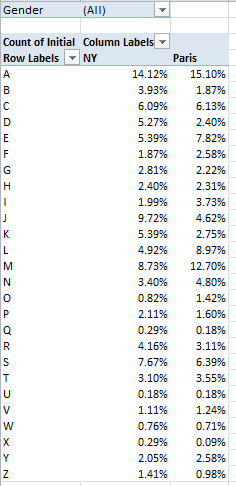
What we can do, of course, is proportion the data, by fractioning say, the ratio of A-initialed names to the respective New York-Paris wholes. This too, normalizes the data, but after a different fashion. For example, we could try out this pivot table:

Row Labels: Initial

Column Labels: City

Values: Initial (again, by Count, and % of Column total)

Report Filter: Gender

I get:

 nyp2

(N.B. One need only click the % of Column Total here option once. The NY and Paris values are exactly that – plural items or values in the selfsame City field; the two cities don’t stand alone as discrete fields.)

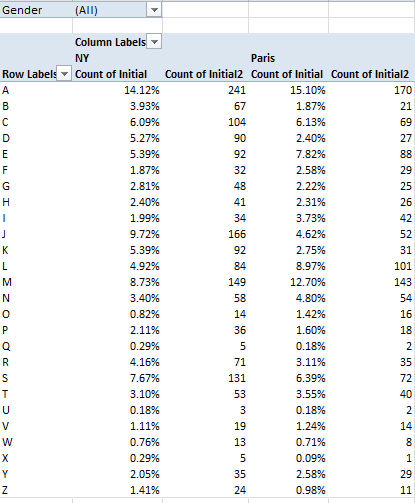
There are comparative differences in there (i.e., the J and M initials), but quite a few distributional resemblances, too. And if you’re wondering about the absolute numbers conducing toward these results, throw Initial into the Values area again and comply with the default Count operation:

 nyp3

And of course, all of the above could be filtered for gender, whose field is peopled by a data curiosity. Some of the Paris names have been spooked by the X factor – that letter having stolen into their Gender fields, presumably in virtue of some documentary/administrative complication. There are but five such names, however – Noha, Felicite, Keziah, Jessy, and Alexy, all of which are sufficiently indeterminate to beg the question of how gender is registered by the French.

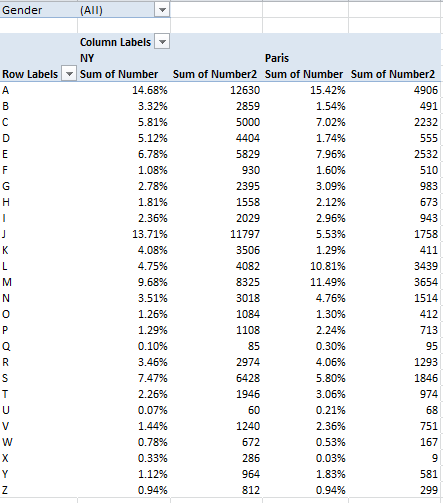
Now we need to amplify an issue to which we earlier devoted a parenthetical aside. The name data before us can in fact be addressed in two modes: First, as a collocation of names, each considered a solitary, once-occurrent datum – the tack we’ve taken until now – or rather, as the sum of all the names borne by the babies born in 2009, a very different conceptual and numeric understanding. Thus by substituting the Number for the Initial field in the Values area for the above pivot table (and remaining here with the default Sum operation), you’ll realize this breakout:

 nyp4

(Yes, feel free to rename the fields if you want to.)The numbers now are much larger, naturally, but by-and-large they jibe with the Initial Count data, and that’s probably none too surprising. And of course all of the above could be filtered by gender, once we look past the five Xs. Thus we see, for example, that a remarkable 19.26% of all New York males received a name beginning with J, even as that letter starts off but 5.16% of the girl names.

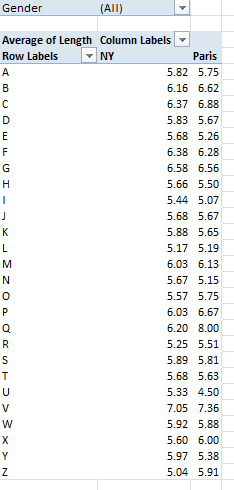
Now substitute Length for Number, summarize by average, and format to say, two decimal places (here you need only recruit Length once for the Values area):

nyp5

The variation is not stupendous, and overall New York names average 5.84 characters to Paris’ 5.78 – a virtual draw (note again, however, that these averages treat the names as one-time iterations, that is, as per the first method we described above. Resorting to the Plan B, in which the aggregate length for all names of all babies (i.e., name Number times Length, all totaled and broken out by each city, and divided by the Number total for each city) I wind up with a 5.89-5.69 New York Paris average name-length split. For the record, you can bring those results about via these expressions:

=SUMIF(D2:D2834,”NY”,G2:G2834)/SUMIF(D2:D2834,”NY”,B2:B2834)

=SUMIF(D2:G2834,”Paris”,G2:G2834)/SUMIF(D2:D2834,”Paris”,B2:B2834)

(Begging forgiveness, a detailing of the workings of the above with take us a digression too far here.  But See, for example, this discussion: http://www.techonthenet.com/excel/formulas/sumif.php)

One additional finding that I, for one, attended with some surprise emerged from a simple question about the names shared by New York and Paris, i.e., how many names appear in both cities’ birth rosters? The answer can be pivot tabled thusly:

Row Labels: Name

Values: Name (Count)

And sorted descendingly by the Values column.

What interests us here, put simply, is the number of names evaluating to a count of 2 – meaning of course that these are the ones which find their way into the birth data of both cities. My pivot table counts 2360 individual names, of which only 446 – or about 18.9% – occurred to parents in both cities. I would have thought that the selection overlap, as it were, for these two Western countries would have canopied far more names. Anthropologists, I sense a post-doc opportunity in the making.

But these data also blow the whistle on two data quirks. A number of Paris names, e.g. Kevin, Sekou – appear twice in the original Open Data Paris download, and in association with the same gender (doubles dot the New Yorks data, too, but these are gender parsed). By the lights of pivot table protocols these redundant mentions are merely flesh wounds, because squeezing repeated instances of the same item into one, and only one, row or column label appearance is precisely what pivot tables are cut out to do. Still, the duplicated names – which were first brought to my attention by a student – are worth asking, or at least wondering about.

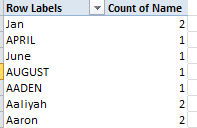
The other quirk is even quirkier. When I ran the above names-shared pivot table, its upper tier read as follows:

nyp6

Now, pivot tables should immediately sort Row and Column Label entries; but the first four labels above clearly aren’t defaulting.  I’ll admit to a thick, initial measure of puzzlement over these out-of-sorts entries, until the light bulb shined a few watts on me. Apart from qualifying as bona fide baby names, Jan, April, June, and April happen to populate Excel’s custom sort lists of the months and their three-lettered abbreviations (see File > Options > Advanced > the Edit Custom Lists button). As such, they’re indeed earmarked to rise to the top of any sort, at least by default (and note that the four month/names sort themselves in chronological order). But if you want the members of this quartet to assume their conventionally sorted place, initiate the pivot table via Insert > Pivot Table, and immediately thereafter click PivotTable Tools > PivotTable button group > Options > the Totals & Filters tab, and deselect Use Custom Lists when sorting.

But alright, mes amis; you’ve worked hard enough today – I’ll spring for the croissants.

Je M’appelle Abbott: Comparing Paris and New York Birth-Name Data, Part 1

17 Oct

There are spreadsheets with problems, if I may be so judgmental, and then there are spreadsheets with meta-problems. I see a hand back there requesting clarification.

It’s like this: much of the expository thrust of this blog has dedicated itself to the former sorts of problems – issues of data quality, and formulaic remedies to other issues. But sometimes even a perfectly sound agglomeration of data begins to act up, when it’s asked to live peaceably with another batch of otherwise perfectly sound data.

It happens. It happens when you want, or need, to – and I use this verb with some hesitation – consolidate two kindred but not –quite-identical sheets into a larger totality (and let’s leave Excel’s Consolidate feature out of this). The meta-problem, then is reconciliation,

And it isn’t as abstruse as it sounds. A case in point: the birth-name data compiled by the municipalities of New York and Paris. There may be any number of piquant sociolinguistic conclusions to be learned from these data, but the data aren’t quite yet fit for the cross-cultural comparative aims we intend for them.

For one thing, the New York data comprises two gender-distributed workbooks; the Paris sheet is of a piece, assigning instead a defining field for gender (as do the New York data, by the way, perhaps redundantly):

 Liste des prénoms 2004-2012(1)

2009_Popular_Birth_Names__Female_

2009_Popular_Birth_Names__Male_

The task, or tasks, then, that prefigure any subsequent analysis: to normalize the data so that they read the same way all the way down, and play on, or with, the same fields.

At least these steps aren’t particularly sequence-dependent.  First, then, we need to understand that even as the Paris data report birth names from 2004-2012, the New York names avail only for 2009, thus tapering the comparison range to but one year – and as such, the Paris year of birth field (annee) doesn’t spur the narrative, and so you want to disassociate the 2009 names from their companion data, which can’t be compared across the two cities. I can think of several ways to make this happen; perhaps the trouble-freest would have you auto-filter the 2009 names, whereupon you’d copy them to a new sheet – and why not a sheet in the same Paris workbook?  I can then simply delete the annee column, because again, all the names with which we want to work, after all, bear the 2009 provenance.

Next, given that the Paris sheet abbreviates gender (or sexe – the field headings are French, of course) I’d turn to the New York sheets and run a find and replace through their gender data, replacing Female and Male with their respective initials. (I’m not bothered by the all-capped New York names, though a restoration of these is just a PROPER function away. =PROPER(B2) on the Female birth name sheet, for example, will restyle ISABELLA into Isabella.).

I’d then copy-paste all the New York gender identifications into the next available Sexe cell into this new sheet (I’ll rename the field Gender), and follow through with a parallel copy-paste of the New York names, taking pains of course to line up each name with its gender. I’d also ignore the New York Rank data; these are nowhere to be found among the French names, and we can order all the data from both countries in a pivot table in any case. And of course you also have to copy the New York name counts to our sheet-in-the-making, again seeing to it that each number is properly affiliated with its name. And while we’re at it, I can rename prenoms Name, and nombre Number (if you parle Anglais).

Now our working fields – Name, Number, and Gender – need be staked to a fourth one, one that differentiates the pair of cities whose names we want to compare. Thus we can type City in Row 1 of the next free column, Enter Paris in what for me at least is D2, and copy it all the way to row 1127, or whichever cell on your sheet stores the last French name. Then enter NY one row down and copy to your last New York name, which for me tucks itself into row 2834. (You can tell where the New York names start; they’re the ones puffed up in capitals.)

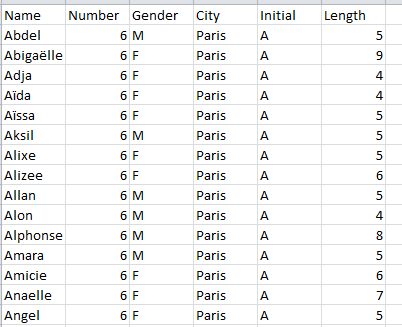
All this to-and-froing means the sheet under construction looks something like this (depending on how or if you’ve sorted the data in any way), in its upper reaches:

nyparis1

And irrepressible lad that I am, it seems to me that a minting of two additional fields could usefully inform the data. Because we might want to learn something about inter-city first-initial naming preferences, we can call the next available column Initial and enter in what is for me E2:

=LEFT(A2,1)

And of course copy all the way down.

We might also be concerned to do some trendspotting about name lengths. If so, move on to column F, name it Length, and type in F2:

=LEN(A2)

and copy accordingly.

Now our reconditioned sheet – an admirably lean composite, all of whose fields are eminently usable and worth a breakout or two – looks good to go.

But before we go, there are a couple of yellow lights at which we need to pause. Note that the New York data calls for a name-reporting minimum of ten births; that is, a given name must identify at least ten recipients before it achieves a listing. The corresponding qualification for the Paris list is five (though the Open Paris website seems to draw the line at six). These floors, even as they’re pitched at different elevations, cache an unknown census of births and names. It’s not inconceivable that a notably large number of babies inherited a notably large numbers of names, each of which was conferred upon a few babies each. That missing cohort isn’t accounted for here.

The other yellow light flashes a bit more brightly. New York is far larger city than Paris, and so divulges far more reported births – 86,021 to the City of Light’s 31,809, to be exact.  How that disparity can be reconciled needs to be thought about. So let’s start thinking.

Spending Time on Parliamentary Expenses: Part 3

10 Oct

Submit a report for £23,000,000 worth of expenses for that business trip and it’s safe to say your boss’ll want you to account for each and every pence of it. For Britons – the putative bosses of their members of Parliament – that accounting is putatively here, at

http://parliamentary-standards.org.uk/DataDownloads.aspx (click the 2012-13 link; again, at 40 MB the file would crumble WordPress’ cookies were I to thrust it upon my blog).

(Note before we size up the data that a far larger sheet, at http://parliamentary-standards.org.uk/ (click the tiny here link), historicizes £98,000,000 worth of outlays. That number also drops salaries into the equation, while our sheet considers expense requests only, but dates each request.)

It should also be added by way of extended preamble that these numbers may have found their way to parliamentary-standards as a species of after-the-fact restitution for the 2009 expense scandal that agitated Parliament (and the voters) and which was, as they say, in all the papers. (For a defense of current expensing practices see this apologia.)

The file is rather ready-to-go, I must say, though you could slice the Year, field in column A off the grid, as it contains nothing but the redundant 12/13 entry. (If however, you were to copy-and-paste the 2011-12 expense data available from the same web venue onto our sheet here – not a bad idea – you’d want to retain the field, in order to disambiguate the two years’ data).

Now that you’ve jammed 187,000 records into your PC’s medulla we can pivot table away, beginning with the most obvious datum: the expense amounts claimed by each MP:

Row Labels: MP’s Name

Values: Amount Claimed (Sum)

Format as you wish. You could then move to sort these, although I’d gather that Alistair Carmichael might vote against that rearrangement. Mr. Carmichael, a Liberal Democrat MP from Orkney and Shetland in Scotland, expensed his way to the first position, requesting – and receiving – £82,949.70. By no means does that sum suggest any manner of malfeasance, however, and indeed, Mr. Carmichael’s peregrinations to and from his home base at the tip of Scotland – about as far away from Westminster as an MP can get – might have served to have engorge his travel costs. (Jim Dowd, the current expense league leader for the first two months of fiscal 2012-13, is hunched down at number 524 for 2012-13.)

And because the factotums in the Cameron-Clegg administration likewise play the MP role – an elision of powers you won’t find in the States – their expense requests, including those of Messrs. Cameron and Clegg themselves, are out there for all to see.  Mr. Cameron entreated an austere £6,923.50 during the 2012-13 year, but Mr. Clegg’s £37,672.52 actually brushed past the MP average of £36,043. Labour’s opposition leader Ed Milliband asked for a prudent £26,320.07, even as erstwhile Chancellor of the Exchequer Alexander Darling, about whom expense questions had been raised, filed for £47,381.48, good for 155th place out of the 654 MPs. On the other hand, there’s Michael Fallon (himself implicated in the above expenses controversy), who for 2012-13, at least, checked in with exactly £38.74 worth of requests, these for two stationery purchases. One overarching investigative leitmotif, then, might simply concern itself with the immense variation in expense sums, quite apart from any question of impropriety.

You could then undertake to compare aggregate expense requests by MP to their average request size, by recalling Amount Claim to the Values area a second time and Summarizing now by Average. Assuming your pivot table data kick off at row 4, you could then correlate the two Amount columns thusly:

=CORREL(B4:B657,C4657)

The result:  -10003, or by standard statistical lights, no correlation.

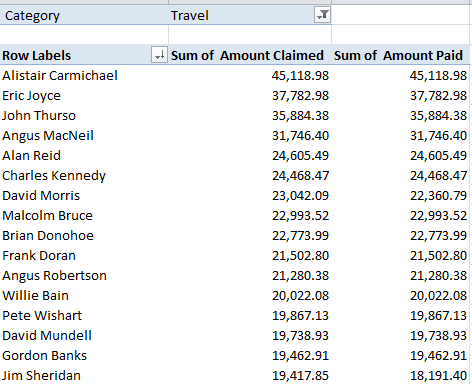
Now tighten the thread, by swinging Category into the Report Filter field and ticking Travel. In part, I get:

parl31

Again, Mr. Carmichael heads the class, commending a larger research charge, then: to correlate MP distances from London with their travel claims. Throw Journey Type into Column Labels in the above table, and the breakout identifies over £17,000 for Between London & Constituency travel, for Carmichael, along with over £7,000 for Within Constituency Travel and another £19,000-plus earmarked for what’s termed Non-London MP-to/from London travel, explained again to me by Frank Oppong to denote the aerial comings and goings of other-than-London-resident MPs to the capitol.

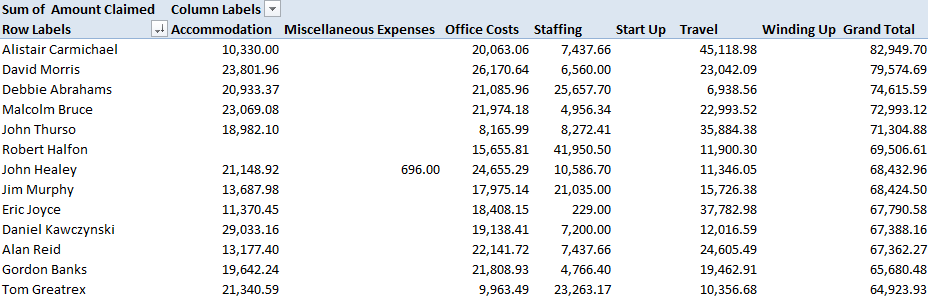
If you then replant Category into Column Labels you get something like this:

parl32

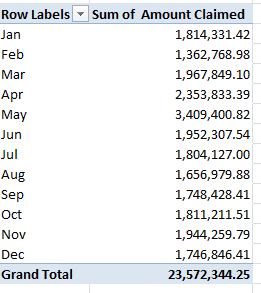
Now if you want a dash of seasonality, try for starters:

Row Labels: Date (grouped by month)

Values: Amount Claimed

parl33

One might thus want to give some pause to the May claims, which may – may – attest early-fiscal-year jumpstarting. Indeed – if you regroup Date by Quarter alone:

 parl34

The May (and April) inputs bulges Quarter 2 unmistakably.

As does my stomach. I had a big lunch today – and it’s reimbursable. But don’t worry, watchdogs – it was all strictly private sector.

Spending Time on Parliamentary Expenses: Part 2

3 Oct

If the data don’t make sense, ask yourself if you’ve had too much coffee – or not enough. Then look again, and ask yourself this time if it’s the beholder, or the beheld.

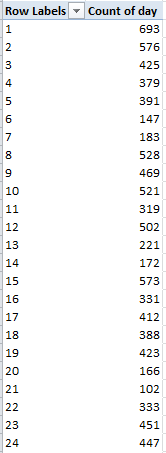
Because sometimes it isn’t the caffeine. Case in point, I think: my post a fortnight or so ago on UK Parliamentary data and the curious findings attaching thereunto. I reported then, for example, on the  intermittently text/numeric statuses of the dates notched in the expenses parliament 2013-2014 workbook, and the most curious piling of expense requests in both the fourth month and the fourth day of months, e.g.,

parl3

I concluded my post with suitable notes of bewilderment about these calendrical conundrums, and asked for some time to think about these, which you kindly granted.

And in the course of my review it occurred to me that a second look of the data might be in point, the better to persuade myself that my puzzlement was neither hallucinatory nor caffeinated, nor flat-out mistaken.. I thus downloaded the expenses parliament workbook (now somehow called DataDownload_2013.csv) anew from the selfsame www.parliamentary-standards.org.uk site

 Data download

and conducted the selfsame

=COUNT(B2:B10582)

operation at the base of the Date field in column B I had performed on the column two weeks ago (and yes, the perspicacious among you will recall that the range stopped at B10581 then). That earlier COUNT aggregated to 5132; but the second take above yielded 10581, a proof that the dates – all of the dates – have now assumed their rightful numeric standing.

Something clearly had changed in the intervening two weeks, disquieting the quality controllers at Parliamentary Standards and urging a rethink of the data upon them, with an ensuing rectification. I don’t presume to know what happened, and won’t dare to assume my previous post had anything to with it.

But musings aside, if you pry open a new column to the immediate right of Dates, call it Day and enter

=DAY(B2)

in what is now C2 and copy it down the column (you can turn off the decimals if you wish and you may have to reformat both this and the Month field into numeric, as opposed to date, status), we can redirect the data to a rudimentary but telling pivot table:

Row Labels: Day

Values: Day (Count)

I get (in part):

parl21

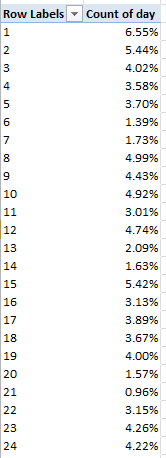
That’s starting to look more like it; the 4ths portion of the whole seems none too egregious. Revise the Values (Count) to Show Values As > % of Column Total and:

parl22

the request-by-day-of-month distribution begins to normalize, though even now no 31st day of any month is represented.

That all looks better; but now admit another new column between Day and Claim No., name it Month and enter in D2:

=MONTH(B2)

and copy all the way down. Start scrolling until you begin to get the idea. There’s nothing but 4s and 5s in there, a set of frequencies too improbable to let stand without a jot of scrutiny.

Or so I thought, until I was enlightened by an unnervingly obvious truth. Your vexed correspondent pointed an email to Parliamentary Standards, whose representative Frank Oppong got right back to me with a decisive clarification. He pointed out that the 2013-14 data as we have them delineate expensing only through May of this year (with the fiscal year kicking off in April), adding that the June and July installments should be put into place next month. (Nevertheless, my questions about the original sheet’s date character appear to remain in point.)

Indeed – if you download the 2012-2013 expense data in their 40MB plenitude, you’ll be heartened to find all the months and days (including all those 31sts) accounted for, and in perfect numeric shape.

But before I dismiss the class, and given the understanding that the 2013-14 sheet presently encases but two months of data, try this pivot table nonetheless:

Row Labels:  MP’s Name

Values: MP’s Name (Count)

Amount Claimed (Sum)

Sort the results first by Count of MP’s Name and none other than Peter Bone, a Conservative from Wellingborough, a town pitched 70 miles to the north of London, ascends to the top with 94 expense requests, mostly for vehicle outlays (the MP roster of names, by the way, includes many notables, among these the actress-cum-politician Glenda Jackson and of course David Cameron, who lodged only five requests. Then again, he probably doesn’t have to issue expense requests. His coalition partner Nick Clegg filed ten.) On the other hand, 18 MPs registered exactly one request.

Then sort that table by Amount Claimed and Mr. Bone slinks back to number 149, giving way to Jim Dowd, a  Labourite from London whose constituents will be pleased, or at least interested, to find their man soaring to the first position, with £19,294.43 in requisitions for the first two months of fiscal 2013-14.

In sum: the 2013-14 data are as they stand are qualitatively serviceable, but simply have yet to ingather the expense filings accumulated in the recent past (the post-May interim). I should have known. When the elephant is in the room, after all, be sure at least not to let it step on your foot.  So let me tack on a Part 3, in the interests of seeing how 187,000 full-year 2012-13 expense requests break out and justify themselves to Mr. and Ms. Taxpayer.

And apropos all the talk here about mistakes on either side of the screen, the European Spreadsheet Risks Interest Group (EuSpRIG) spends a good deal of its time on the matter of spreadsheet errors (often ones committed somewhere at the high end), and conducts an annual conference highlighting its work. You may want to check it out.